Howtotradeblog is a website to guide and share useful knowledge about trading in IQ Option, Olymp Trade, Binomo... We do not encourage you to make large amounts of money that are not realistic but to help you earn small profits every day.
Website: howtotradeblog.com
Youtube: https://bit.ly/howtotradeblog-youtube
The best thing about trading is to withdraw profits after winning. And Neteller will help you make a quick IQ Option withdrawal. This article will guide how to login and withdraw money from IQ Option to Neteller account in just 5 simple steps.
Video showing how to withdraw money from IQ Option to Neteller account
How to withdraw money from IQ Option to Neteller
Login to your IQ Option account
Login to your IQ Option account. Select the triangle icon located to the left of the amount.
Select “Withdraw Funds” to make a withdrawal
Choose Neteller as the withdrawal method
Complete the information required
– Account: your Neteller email
– Amount: The money you want to withdraw (must be less than the available balance).
Click “Withdraw funds” to send IQ Option your withdrawal request
For example, in the image below, I chose to withdraw to Neteller with the amount of $25.
Click “Withdraw funds” to send IQ Option your request
Your IQ Option withdrawal request now is in progress
After you send the request, IQ Option will notice that it is now in progress. The money will be transferred within 1-3 working days.
Your IQ Option withdrawal request now is in progress
Check IQ Option account balance
When the system accepts the withdrawal request, the money in your account will be deducted. To make sure, you can check if your money has been transferred out of your IQ Option account or not.
The money has been deducted from your IQ Option account
When the money has come to Neteller, you will receive a notification email from IQ Option. Now you can check the balance in the Neteller account.
Successful IQ Option withdrawal notification
If you have any problems when withdrawing money from IQ Option, please leave a comment below.
When participating in trading in Binomo, depending on the amount of capital you deposit, the platform will offer you the type of account with different advantages. Let’s read some reviews about what those types of Binomo accounts are, how to upgrade, and the benefits they bring in this article.
In the Binomo interface, click on the “Cashier” menu, then select “Account type”. You can see there are 4 types of accounts that Binomo provides for traders.
Now, let’s go deeper into each type.
Reviews four Types of Binomo accounts
Binomo Demo Account
This is the type of account you will receive immediately after registering a Binomo account. You can use Binomo demo account to familiarize yourself with the interface and to practice before depositing money to make a real profit. In this account, Binomo gives you $1000 to practice trial trading. This is one of the great advantages of Binomo.
Regarding this account type, there are some certain limitations as follows:
– You can only use the free amount of $1,000 in trial transactions. It means that you can’t withdraw this free amount of money.
– Only 18 pairs of assets are available for trading.
– Only free contests hosted by the platform are available.
However, the demo account will be very helpful for you in the training and preparation steps before trading with real money.
Basic Binomo account (STANDARD)
You need to deposit at least $10 to be able to upgrade to this type of account. This is equal to the Binomo minimum deposit amount.
Basic accounts have the following restrictions:
– The number of asset pairs allowed for trading is 39 pairs, 21 more pairs than the practical account.
– The withdrawal time can be extended up to 3 working days.
– Only basic contests of the platform are available.
– The highest level of income rate is only 84%.
– The maximum bonus is of 80% for each deposit.
Gold account (GOLD)
This is the type of account you will receive from Binomo when depositing a minimum of $500 or more.
Gold Binomo account
Regarding this account type, the platform also offers more privileges for you, namely:
– Over 42 asset pairs including currencies and cryptocurrencies are available for trading.
– Withdrawal requests are processed within 24 hours.
– Gold level contests and contests of lower levels are available.
– The income rate of transactions can be up to 86%.
– The highest bonus will be 90% of the total deposit.
– Investment insurance to protect your money.
– Advice on the trading and investment process as well as answers for questions are available with a private manager.
– Analysis support with a variety of trading strategies by experts is available.
– Weekly cashback is 5% of the real lost amount.
Diamond Account (VIP)
This is the highest level of an account which is also the level that Binomo will give you the most advantages. In exchange, you will have to deposit at least $1,000 to be able to receive this account type.
VIP Binomo account
The advantages of VIP accounts are as follows:
– VIP customers can receive a bonus of up to 100%.
– The fixed income rate can reach 87%.
– Withdrawals are processed within no more than 4 hours.
– The most complete list of tradable assets (49).
– Risk-free transactions for real money are available.
– Online analysis support by VIP management is available.
– There is also a range of exclusive privileges available only to VIP customers.
– Weekly cashback is 10%.
To conclude
The above shows the types of accounts that Binomo provides to traders when participating in trading on the platform in the most detailed reviews. Depending on your needs, purposes, and level of trading, choose the appropriate account type. We hope that this article will be useful for those who seriously consider investing to make a profit in Binomo.
Everything involving your money needs to be secure. This is the principle in making money Online. If you deposit money and consider Olymp Trade as a trading channel, then you need to protect your own money. In this article, How To Trade Blog will guide in detail how to use Olymp Trade Google Authenticator (GA).
Video clip showing how to use GA to protect your account
How to use Olymp Trade Google Authenticator
Install the Google Authenticator app on your smartphone
Google Authenticator is the most trusted security application of Google currently. You can download this app to your phone or laptop by visiting Google Play or App Store. Depending on the operating system of the smartphone, you will choose the appropriate version.
Install Google Authenticator
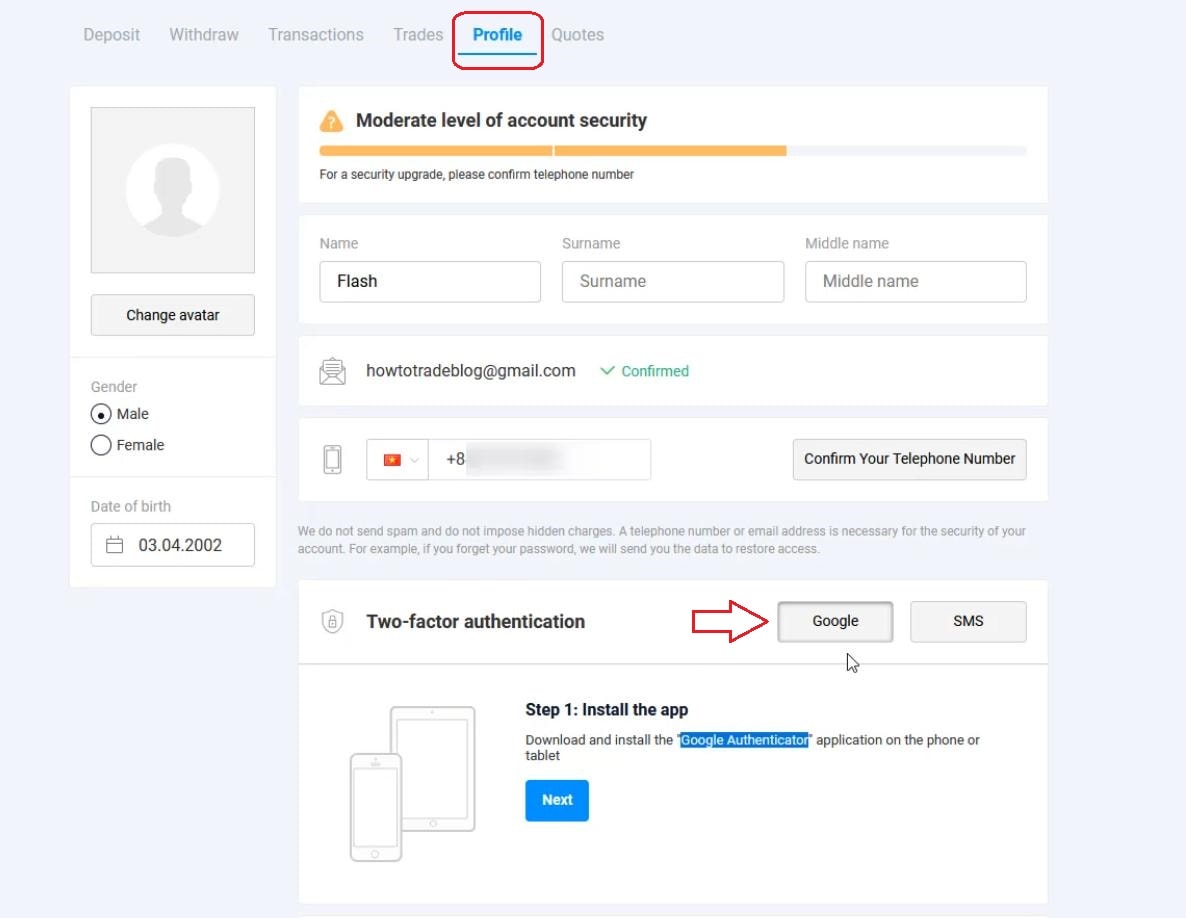
Go to your Profile
Choose two-factor authentication with Google
How to install Two-factor authentication
Note: You can also choose security by SMS. But sending messages from the platform to your phone number is not stable. It’s quite fast but sometimes it could be very slow.
Use Google Authenticator app to scan the QR code on the website
Use your smartphone to scan the QR code on the website
Enter the 6-digit number on the app
Enter the security code from Google Authenticator app
Pay attention to the green at “Google”. This is the notification that your account has been successfully protected.
Your account is now secure
Login Olymp Trade again to check
After you activate two-factor authentication for the account, the website will ask for 6-digot code every time you log in. Just turn on the app and enter these 6 numbers.
Enter the 6-digit code to log in
So now, your account is extremely secure! You don’t need to worry about someone hacking or logging into your Olymp Trade account anonymously.
You have some troubles with your Olymp Trade account? Maybe they are deposit or withdrawal problems. Or you want to know how to delete your Olymp Trade account. There are also many other reasons. The best solutions for all these issues are to contact Olymp Trade customer care service either by live chat or call directly to the Hotline number in each country.
Video clip showing how to contact Olymp Trade customer care service
Case 1: Olymp Trade login account error
Your account has problems when trying to login Olymp Trade. Or Olymp Trade locked your account? In this case, you can contact directly with Olymp Trade hotline via the following steps.
Find support information of Olymp Trade
Find Olymp Trade support information
Select the country you live in
Olymp Trade has a specific customer care number in each country.
Select your country language
Get a phone number and call Olymp Trade
Olymp Trade hotline number
Olymp Trade will have an operator to assist with the language you choose. So please remember to choose your country language or the one you speak fluently.
Case 2: Olymp Trade deposit or withdrawal error
Problems many traders often face are slow withdrawal or unable to deposit. If this is the case, don’t call directly because it doesn’t help you solve this problem. You only need to send an Email or Chat with Client Support. You should attach the necessary photos so they can understand and solve your problem more quickly.
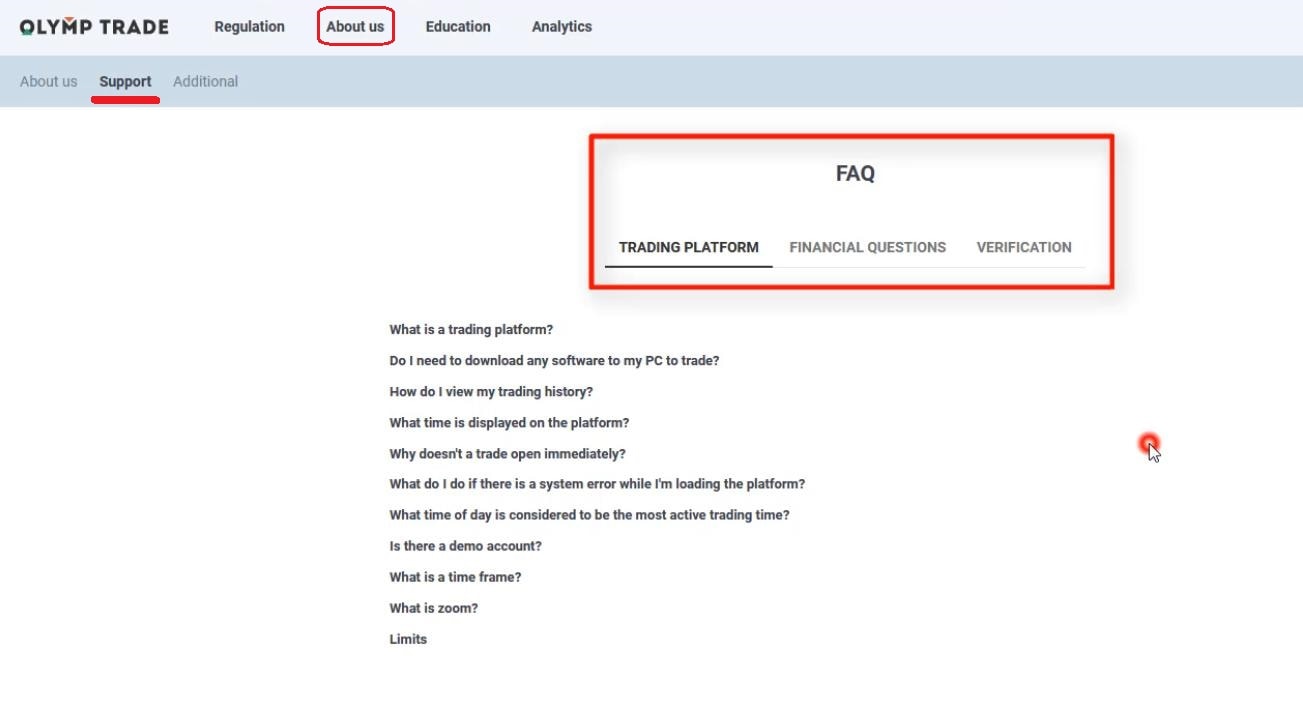
Click Support in the Help section
Click Support in the Help section
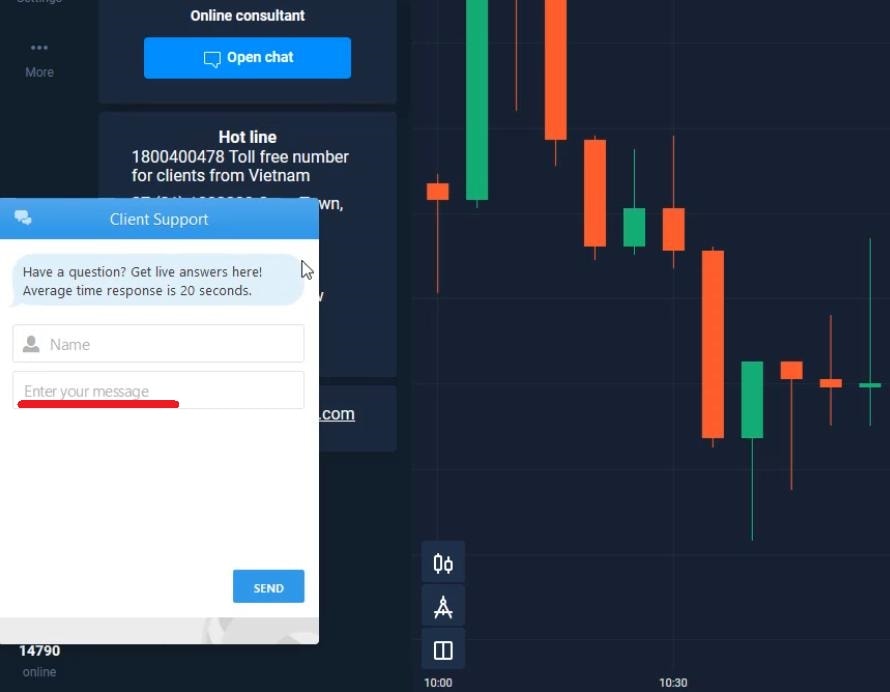
Turn on Chatbox and talk to support staff
Turn on Chatbox and talk to support staff
Just use the language of your country in case you don’t know English. Olymp Trade operators will answer and solve your problems.
Case 3: How to delete Olymp Trade account
Do you want to delete your old account to create a new one? To do it, send an email to Olymp Trade and provide the account you want to delete. Within 1 to 3 days, Olymp Trade will assist you to close your account.
Olymp Trade email: support-en@olymptrade.com.
How to delete Olymp Trade account
If the issues you’re dealing with aren’t in this article, please leave your comments below. We will support and give you the answer.
Olymp Trade is the platform that gives a lot of promo code to encourage their traders to deposit money. And if you are an Olymptrade beginner who has just learned and wanted to make money here, then you should use this Promo code to increase from 30% to 50% or even 100% of the total deposit.
This article will guide you in detail on how to use the Olymp Trade promotion code when depositing.
Video showing how to use Promotion code of Olymp Trade
How to use Olymp Trade promo code
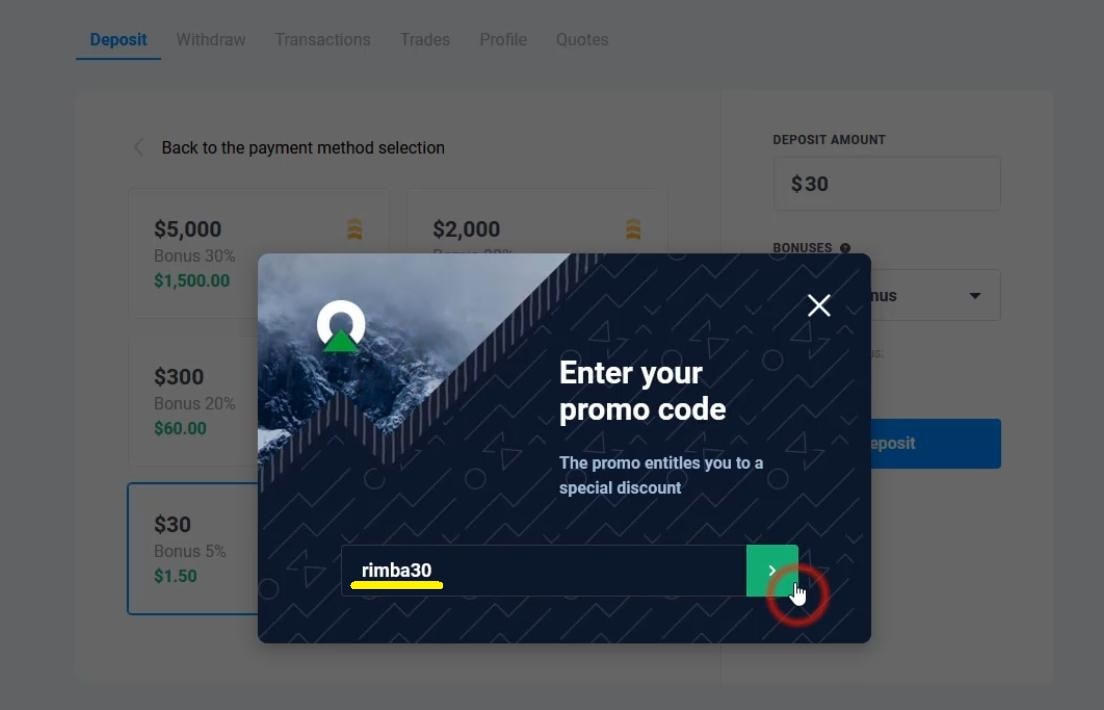
Deposit and enter Olymp Trade bonus code
How to use the Olymp Trade promotion code
For example, Code “rimba30” increases 30% bonus of the total deposit money.
Olymp Trade promo code
Active coupon code for Olymptrade
Remember that you can only use each code 1 time only.
Olymp Trade 30% coupon code
Choose the amount you want to deposit to your Olymp Trade account
Choose the amount you want to deposit to your Olymp Trade account
Check your account again
If you deposit $30 into the account, you will receive an additional $9 bonus (30%). And $39 is the total amount you can trade in Olymp Trade.
Check your Olymp Trade account
At Howtotradeblog.com website, we will continuously update the promotion code of Olymp Trade. If you need Olymp Trade bonus code, please leave a comment below.
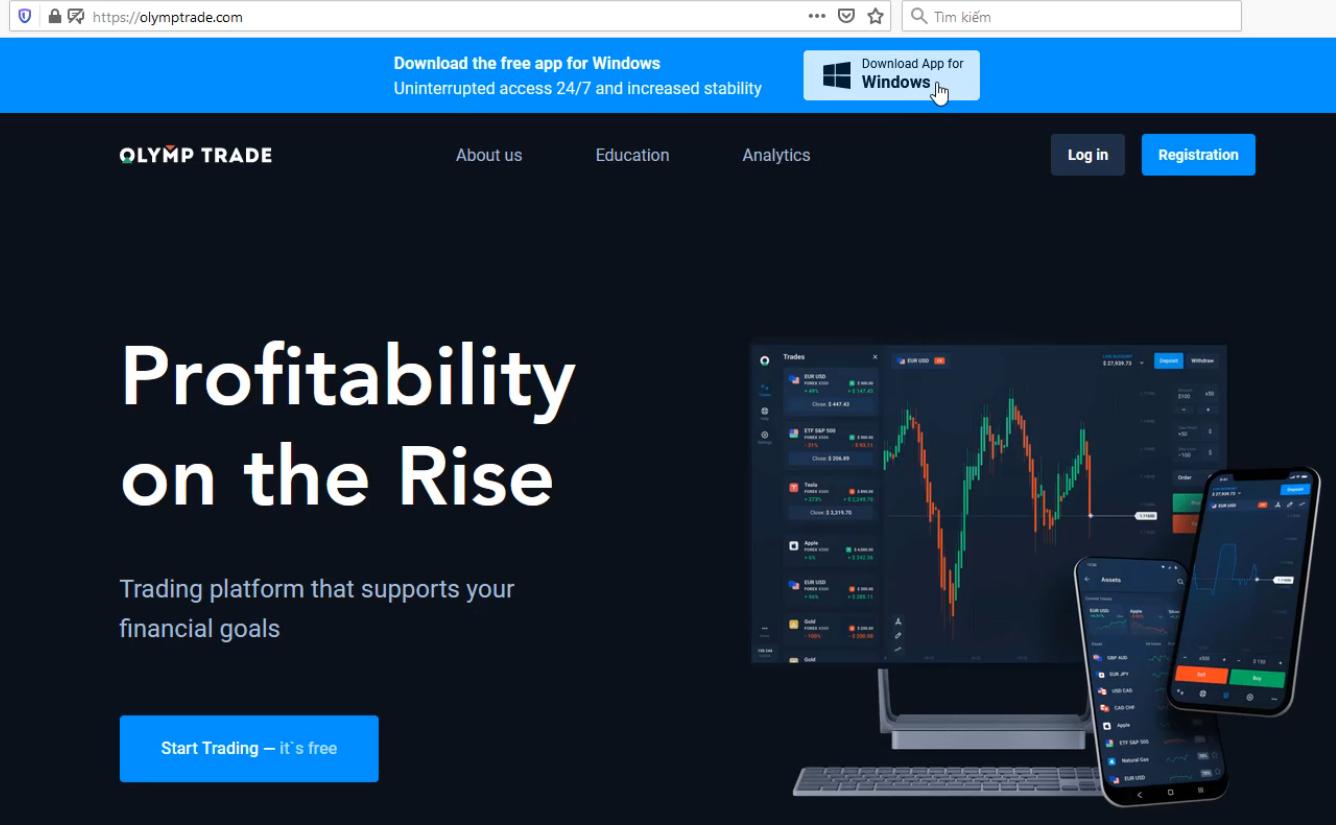
To avoid the lag when you trade on the website, Olymp Trade has developed its own app for PC and laptop. It helps users trade more conveniently and comfortably. At the same time, a standalone application lets you add trading BOTs to earn money automatically. In this article, How to trade Blog will guide the most detailed way to download and install Olymp Trade app for your desktop.
Select the Olymp Trade file that matches the PC configuration you are using
If you have a Macbook, select “Download for macOS”.
Choose the file that suits your computer
Download Olymp Trade app to your computer
Download Olymp Trade version for your Laptop
Install the downloaded file
Install Olymp Trade version for desktop
Login and start using the Olymp Trade application
After installing, Olymp Trade icon will appear outside the main screen. You can click it to enter the application.
Olymp Trade icon on the desktop
Login Olymp Trade on your laptop and start trading as usual. But now, it’s more stable and you don’t have to worry about the lag or bug on the browser.
Login to Olymp Trade on Laptop
If you have any problems when downloading the app, please let us know by leaving a comment. We’ll help you right away.
And in case you still don’t have an Olymp Trade account, support us by registering through the box below. Thank you so much for your time.
Together with Neteller, Skrill is one of the world’s leading prestigious payment method. At the same time, many traders also believe that Olymp Trade withdrawal to Skrill is said to be the fastest currently. In this article, I will show you how to withdraw money from Olymp Trade to Skrill account. It’s very simple, safe and fast.
Video clip on how to withdraw money from Olymp Trade to Skrill
How to withdraw money from Olymp Trade to Skrill account in 3 steps
Select “Withdraw” on the trading interface
Select “Withdraw” on the trading interface
Enter the amount you want to withdraw
Enter the amount you want to withdraw
Olymp Trade will automatically transfer money to the account you used to deposit funds. If you deposit Olymp Trade with Skrill, the system will automatically transfer to the same account. Olymp Trade minimum withdrawal amount is $10. The maximum withdrawal amount does not exceed the total balance of your account minus the Bonuses.
Olymp Trade system confirms your withdrawal request
Olymp Trade withdrawal confirmation
Check your Skrill account balance
As soon as you make a withdrawal, Olymp Trade will send a confirmation email to you.
Olymp Trade withdrawal confirmation email
Money will be transferred to Skrill e-wallet from Olymp Trade within 10 minutes to 3 hours.
Check your Skrill account balance
Problems when withdrawing money from Olymp Trade and how to fix them
The amount you want to withdraw exceeds the allowed balance (Total Money – Bonus). You are not allowed to withdraw the Bonus amount that Olymp Trade has given you during the deposit process. Please note this.
Absolutely not “cancel withdrawals” during the transaction process. You must follow this principle strictly.
All withdrawals from Olymp Trade to Skrill will be processed within 3 working days. If after 3 days, you do not receive your money, immediately contact Olymp Trade support.
If there are any problems with withdrawal in Olymp Trade, please leave a comment below. We’ll answer you as soon as possible.